
In this article, we will review 2 ways to convert MKV to WMV, either take advantage of computer application Wondershare Video Converter Ultimate or make full of free online tool MKV to WMV converter.
- Part 1. MKV to WMV Converter Desktop Software
- Part 2. MKV to WMV Online Converter
- Part 3. Wondershare Video Converter Ultimate vs. Online MKV to WMV Converter
Part 1. MKV to WMV Converter Desktop Software
Wondershare Video Converter Ultimate has the ability to convert over 150+ common and unusual video formats without quality loss and at 30x faster than conventional video converters. To Convert MKV files to WMV on this video converter, first download the latest binaries of the application from the following links available for both Windows and Mac.
 Wondershare Video Converter Ultimate - Best Video Converter for Windows / Mac (Sierra Included)
- Directly convert MKV to WMV, MP4 to VOB (DVD-Video ), AVI, MOV and 1000+ other formats.
- Burn MP4 to DVD disk to play with your DVD player at 30X fastest speed.
- Optimized conversion presets for iDVD, iMovie, Final.
- Edit videos with the advanced video editing functions like trimming, cropping, adding watermark, subtitles etc.
- Download videos from YouTube and other 1000+ video sharing sites.
- Supported OS: Windows NT4/2000/2003/XP/Vista/7/8, and Windows 10 (32 bit & 64 bit), Mac OS X 10.12 (Sierra), 10.11(El Capitan), 10.10, 10.9, 10.8, 10.7, 10.6
 Security Verified. 5,481,347 people have downloaded it.


How to Convert MKV to WMV Using Wondershare Video Converter Ultimate
After downloading and installing the application, launch it and follow the detailed steps below.
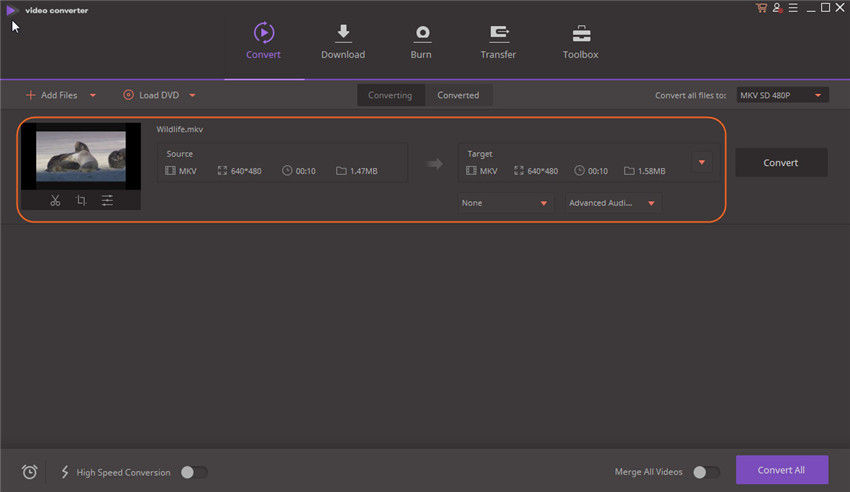
Step 1 Open Wondershare and import the MKV file into the primary interface via the Add Files button
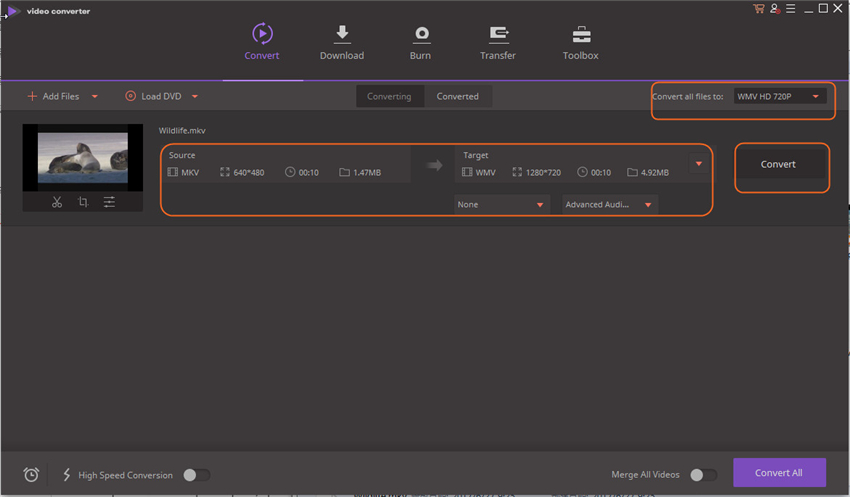
Step 2 Go to the Convert all files to section on the right pane and select WMV under Video > WMV

Step 3 Press on Convert button on the right of the window to convert MKV to WMV and wait for a few seconds for completion.
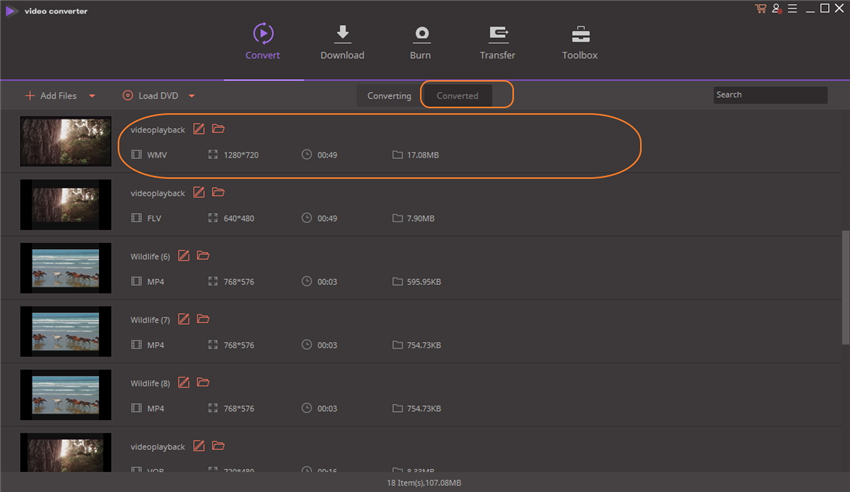
Then you can check the converted WMV files from the Converted folder on the middle of the software interface.
Part 2. MKV to WMV Online Converter
Turning to free online tools to convert MKV to WMV is also a way out, but before that please consider using online converter from a trustworthy vendors. Desktop-based applications are memory and processor intensive and sometimes inconvenient. For convenience purposes, one can consider online options even though at times they can consume time while uploading, converting and downloading the converted. One such online conversion site is free MKV to WMV converter.
How to Convert MKV to WMV via Online Tools
Click here to access the online converter and you'll get a page as below, then following the instruction to convert MKV to WMV step by step.
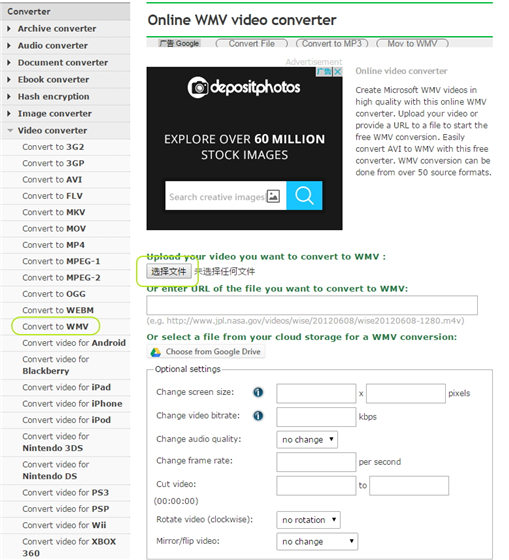
Step 1 Click Choose File to import MKV files to the online tools.
Step 2 Press on Convert button to start MKV to WMV conversion.
When the conversion ends, you can download the converted WMV files into you system directly.
Part 3. Wondershare Video Converter Ultimate vs. Online MKV to WMV Converter
| Product Feature | Wondershare Video Converter Ultimate | Online MKV to WMV Converter |
|---|---|---|
| Convert MKV file to WMV and other formats |
|
|
| Video Quality after MKV to WMV Conversion |
|
|
| Conversion Speed |
|
|
| Editing MKV before Conversion |
|
|
| Burn MKV to DVD |
|
|
| Internet Requirement |
|
|
| Fetch and Add Movie & TV Show Metadata |
|
|

Jun 30,2017 10:07 am / Posted by Christine Smith to MKV
Hot Articles
- 3 Methods to Convert MKV to MP3 for Playing back
- 5 Recommended MKV Converters for Mac Users You Deserve to Know
- Top Three Video Splitters to Cut MKV Files without Quality Loss
- How to Stream MKV to TV with Chromecast
- Top 3 MKV Video Player for Mac
- An Excellent Way to Convert MKV Videos to H.264
- Converting MKV to DivX without Losing Quality
- 3 Practical AVI to MKV Converter for Lossless Video Conversion