
MKV is an open Standard free container format that can store various audio and video formats in a single file which leads to the improper execution of the process by many devices. But unfortunately, it is a completely new file format that still many devices can’t directly stream MKV video. MP3 on the other hand, is one of the oldest file formats and almost any device can play it. Then it makes sense why people begin to consider converting MKV to MP3. So come up with the demands, we are going to learn about the 3 easy methods related with MKV file conversion to MP3 through this article.
- Part 1. Convert MKV to MP3 via Wondershare (Recommended)
- Part 2. Use VLC Player to Convert MKV to MP3 (Free)
- Part 3. Convert MKV to MP4 Online (Directly)
Part 1. Convert MKV to MP3 via Wondershare (Recommended)
To convert MKV videos to MP3 for your convenience, you must be careful not to destroy their video or audio quality, which calls for a professional video conveter tool. Then Wondershare Video Converter Ultimate requires your attention, ensuring the original quality after video convertion and providing other additional functions like editing video, burning DVD, streaming video to any external device.
 Wondershare Video Converter Ultimate

- Extract MP3 from 150+ formats, including MKV, MOV, MP4, AVI, etc.
- Convert to optimized preset for almost all of the devices
- 30X faster conversion speed than any conventional converters
- Edit, enhance & personalize your videos file
- Download/record videos from video sharing sites
- Supported OS: Windows 10/8/7/XP/Vista, Mac OS X 10.12 (Sierra), 10.11 (El Capitan), 10.10, 10.9, 10.8, 10.7, 10.6
 Security Verified, 5,942,222 people have downloaded it


Now let’s learn how to it converts MKV to MP3 step by step.
Step 1 Launch Wondershare Video Converter Ultimate and import the MKV media files into the application as shown.

Step 2 Select the output format as MP3 under Audio > MP3 > Specific Quality from the drop-down list of target output section in the right of the program.
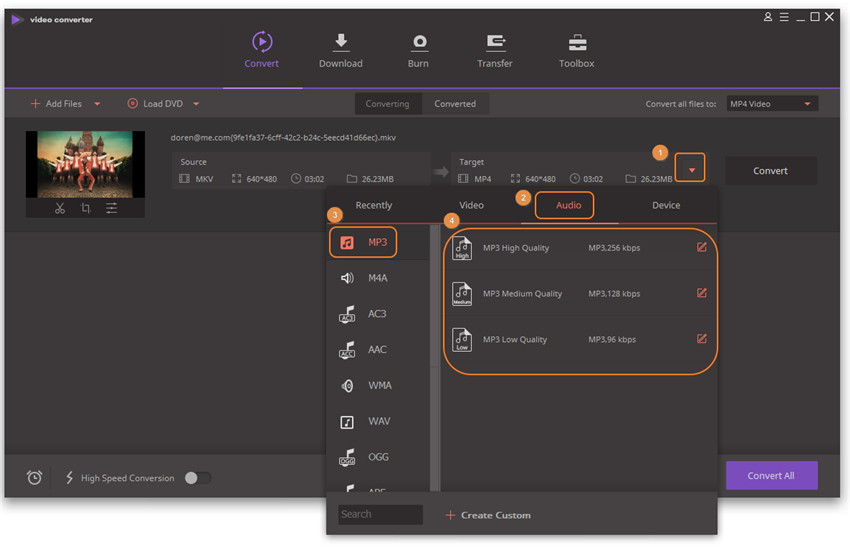
Step 3 Click the Convert button and wait a few seconds till the MKV to MP3 conversion completes.
Part 2. Use VLC Player to Convert MKV to MP3 (Free)
The most popular media player, VLC player can also be used to convert MKV to MP3 convert. The steps for the conversion are as follows.
Step 1 Run VLC player and select Media > Convert/Save from the main menu.

Step 2 Click Add option to import MKV files to VLC, then click Convert/Save button to proceed.
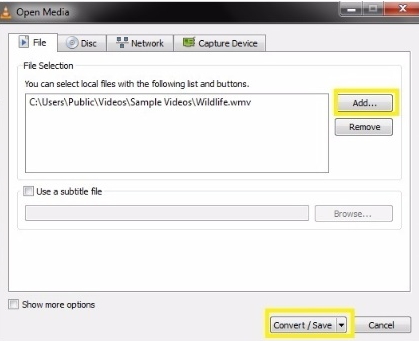
Step 3 Click on the hint button which has the caption Edit selected profile and leave MP3 selected on the Encapsulation tab, click Save to proceed.
Note: Check both VIDEO and KEEP ORIGINAL VIDEO TRACK on the Video tab and the same goes for Audio, tap AUDIO and KEEP ORIGINAL AUDIO TRACK.
Step 4 Then speficy the file folder where you want to save the converted .mp3 file in the Destination file tab and click Start to start MKV to MP3 conversion.
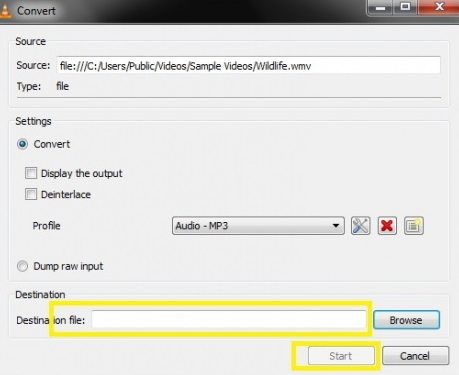
Keep your eye on the progress bar as the MKV to MP3 conversion is executed. Once finished, you'll get your desired MKV video files in .mp3 format.
Part 3. Convert MKV to MP4 Online (Directly)
There are some free websites that help to convert MKV files directly onto MP3 online, which help to kill the lengthy process of software installation followed by file installation. They are used for MKV to mp3 online conversion. One good online conversion site I know is Zamzar.
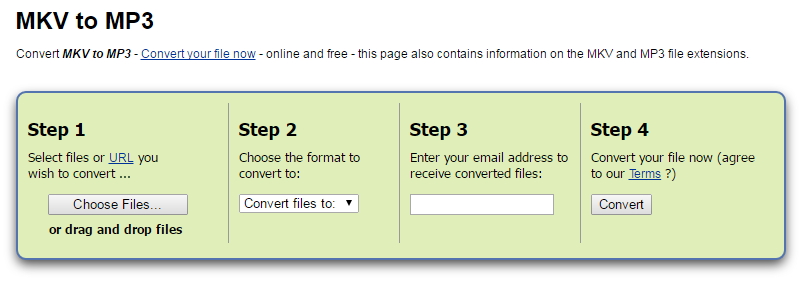
This website has the simplest and easiest user interface, just follow the guidance and you'll effortlessly extract MP3 from MKV file. It takes the least amount of time for even huge files. There're also other similar websites you can take advantage of:
These are all you need to know about the three different methods for the conversion of MKV to MP4. But follow the steps carefully to get the best results.

Jun 29,2017 15:51 pm / Posted by Christine Smith to MKV
Hot Articles
- 3 Methods to Convert MKV to MP3 for Playing back
- 5 Recommended MKV Converters for Mac Users You Deserve to Know
- A Perfect Way to Convert RMVB to MKV on Windows
- How to Convert MKV to WMV/WMV HD
- How to Encode MKV Files with MKV Encoder
- Top 3 MKV Video Player for Mac
- How to Fix Windows DVD Maker Won't Burn MKV Issue
- An Excellent Way to Convert MKV Videos to H.264