
As a world with thousands of 2D video files, it's a big lure for those hardcore media fans to experience the new-rising 3D movies in cinema. And thank those mobile device producers with their 3D equipments, it's now available to have a theatrical 3D experience at home! Well, the only problem that makes us down lie in few 3D video files supplied online and offline. Is it possible to convert 2D to 3D MKV video by ourselves?
It seems like a quite tough work but frankly not at all. You can easily convert video to 3D if you have a professional 3D converter to help. Similar to 2D file, 3D video also has its own format like MKV, MP4, WMV, AVI, etc. Therefore, you need to download Wondershare Video Converter Ultimate that provides ultimate solutions for converting video among all popular file formats including 2D to 3D conversion.
 Wondershare Video Converter Ultimate - The Final Solution to Convert 2D to 3D MKV with Ease

- Convert 2D to 3D MKV with Ease
- Burn MP4 to DVD disk to play with your DVD player at 30X fastest speed.
- Optimized conversion presets for iDVD, iMovie, Final.
- Edit videos with the advanced video editing functions like trimming, cropping, adding watermark, subtitles etc.
- Download videos from YouTube and other 1000+ video sharing sites.
- Supported OS: Windows NT4/2000/2003/XP/Vista/7/8, and Windows 10 (32 bit & 64 bit), Mac OS X 10.12 (Sierra), 10.11(El Capitan), 10.10, 10.9, 10.8, 10.7, 10.6
 Security Verified. 5,481,347 people have downloaded it.


How to Convert 2D Video to 3D with Ease
Here goes the step-by-step guide of 2D to 3D MKV conversion (take MKV format on Windows OS for example). Firstly, download the amazing Wondershare 3D video converter via the download button above, and then launch it after installation.
Step 1 Add 2D Videos to Wondershare 2D to 3D Converter
Generally, you have two ways to add video files for the 2D to 3D MKV conversion task.
1. Directly drag & drop 2D video in any format to the software.
2. Click Add Files button under Convert Section.
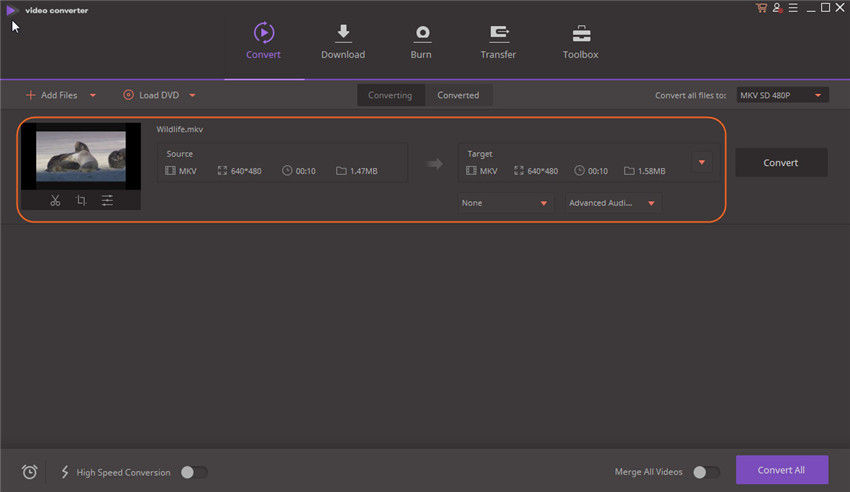
Note: With the function of batch conversion, you are allowed to import more than one 2D files here for 3D movie creating project.
Step 2 Choose 3D MKV as Output Format
Wondershare Video Converter Ultimate provides almost all popular 3D output formats. To simplify 2D to 3D MKV conversion, you can choose 3D MKV output format according to your need. For example, choose the left one if you have Anaglyph red-cyan 3D glasses, no special device or software media player needed or the right one if your 3D display uses Eclipse method or other 3D technologies.
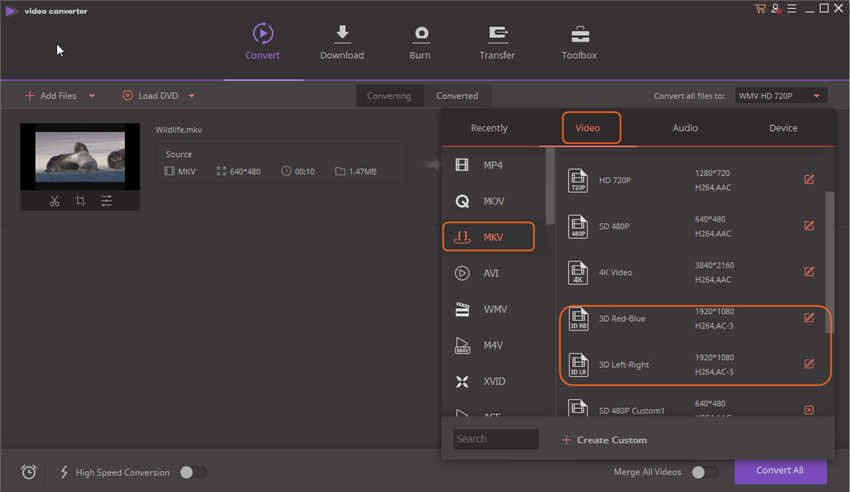
By the way, Wondershare Video Converter Ultimate additionally supplies useful edit functions to enhance your video for a better 3D visual entertainment. Click Edit icon to get corresponding interface.
Step 3 Start Converting 2D to 3D MKV
Hit Convert button and the 3D MKV converter would automatically finish the rest for you. After that, you can freely play 3D video and enjoy your own amazing digital life!
Incredibly easy, isn't it? Wondershare Video Converter Ultimate just assists you to effortlessly create 3D movies with 2D video files in three steps!

Jun 28,2017 16:21 pm / Posted by Christine Smith to MKV
Hot Articles
- 3 Methods to Convert MKV to MP3 for Playing back
- 5 Recommended MKV Converters for Mac Users You Deserve to Know
- A Perfect Way to Convert RMVB to MKV on Windows
- The Final Solution to Convert 2D to 3D MKV with Ease
- How to Convert MKV to WMV/WMV HD
- How to Convert MKV to iPhone 7 Plus/7/6S/6 and All Models (Windows 10 included)
- The Fastest Solution to Play MKV on Samsung TV Easily
- The Easiest Way to Convert MKV to VOB in Seconds